
Last updated on
Nov 9, 2026
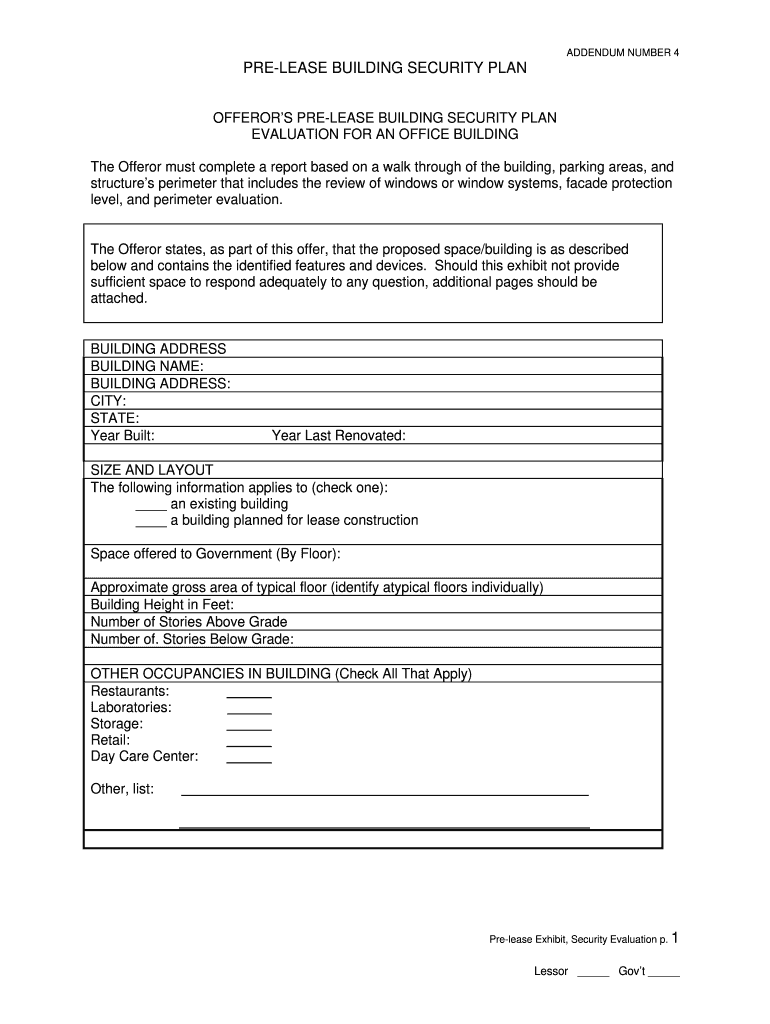
GSA Pre-Lease Building Security Plan free printable template
pdfFiller is not affiliated with any government organization

Fill out
Complete the form online in a simple drag-and-drop editor.

eSign
Add your legally binding signature or send the form for signing.

Share
Share the form via a link, letting anyone fill it out from any device.

Export
Download, print, email, or move the form to your cloud storage.
Why pdfFiller is the best tool for your documents and forms


End-to-end document management
From editing and signing to collaboration and tracking, pdfFiller has everything you need to get your documents done quickly and efficiently.
Accessible from anywhere
pdfFiller is fully cloud-based. This means you can edit, sign, and share documents from anywhere using your computer, smartphone, or tablet.
Secure and compliant
pdfFiller lets you securely manage documents following global laws like ESIGN, CCPA, and GDPR. It's also HIPAA and SOC 2 compliant.
What is GSA Pre-Lease Building Security Plan
The Pre-Lease Building Security Plan is a document used by offerors to evaluate the security features of a building before leasing it to the government.
pdfFiller scores top ratings on review platforms




Who needs GSA Pre-Lease Building Security Plan?
Explore how professionals across industries use pdfFiller.

GSA Pre-Lease Building Security Plan is needed by:
-
Government agencies assessing building security
-
Professional engineers conducting security evaluations
-
Real estate agents facilitating government leases
-
Property managers preparing buildings for lease
-
Contractors submitting bids for government projects
-
Security consultants advising on building measures
Comprehensive Guide to GSA Pre-Lease Building Security Plan
What is the Pre-Lease Building Security Plan?
The Pre-Lease Building Security Plan is defined as a critical document utilized during the leasing process to evaluate the security measures of a building prior to its lease by government entities. This plan is particularly relevant in government leasing contexts, ensuring that potential properties meet required safety standards. A thorough evaluation outlined in this plan is essential for safeguarding the well-being of occupants and assets.
Purpose and Benefits of the Pre-Lease Building Security Plan
Completing the Pre-Lease Building Security Plan provides numerous advantages for stakeholders involved in the leasing process. This form facilitates a comprehensive building security evaluation before lease finalization, promoting security and peace of mind. The role of a professional engineer is vital in this assessment, ensuring that all security measures are sufficiently reviewed and validated.
Key Features of the Pre-Lease Building Security Plan
The Pre-Lease Building Security Plan incorporates several crucial features to aid professionals in assessing building security. Key sections of the form include:
-
Building information and details
-
Perimeter and security information
-
Professional engineer verification
It also requires digital images to document identified security measures and a checklist to identify potential deficiencies.
Who Needs the Pre-Lease Building Security Plan?
The Pre-Lease Building Security Plan is necessary for various parties involved in the leasing process. This includes:
-
Professional engineers responsible for conducting assessments
-
Offerors who are submitting buildings for government leasing
-
Government entities requiring security evaluations for offered buildings
Identifying these stakeholders is essential in ensuring that all responsible parties engage with the security evaluation process effectively.
How to Fill Out the Pre-Lease Building Security Plan Online (Step-by-Step)
To complete the Pre-Lease Building Security Plan online, follow these steps:
-
Access the fillable form on pdfFiller.
-
Begin filling out major sections such as Building Address and Year Built.
-
Document security measures and highlight any deficiencies accurately.
This structured approach ensures that users can complete the form effectively and with accuracy.
Common Errors and How to Avoid Them
While filling out the Pre-Lease Building Security Plan, users often encounter common pitfalls. Key advice includes:
-
Double-checking all entries for accuracy
-
Verifying documentation is complete
-
Reviewing all sections before submitting the form
By being mindful of these common errors, users can enhance their submission quality.
Submission Methods and What Happens After You Submit
After completing the form, several submission methods are available, including:
-
Online submission through the platform
-
In-person delivery to the relevant office
-
Email submission, when applicable
Once submitted, users can expect confirmation of receipt and details about the review process.
Security and Compliance for the Pre-Lease Building Security Plan
Handling the Pre-Lease Building Security Plan requires attention to security and compliance. Key elements include:
-
The significance of protecting sensitive information
-
Compliance with HIPAA and GDPR standards when using pdfFiller
-
Data protection measures for the secure storage and sharing of documents
These aspects ensure that all processes involved in handling the plan adhere to necessary legal requirements.
Sample or Example of a Completed Pre-Lease Building Security Plan
For users seeking guidance, a filled-out sample of the Pre-Lease Building Security Plan serves as an excellent reference. This sample will illustrate:
-
A visual representation of a completed form
-
Detailed explanations of each section
-
The significance of correctly filled fields in the context of security evaluation
This reference aids users in understanding how to effectively complete their forms.
Empower Your Security Evaluation with pdfFiller
Utilizing pdfFiller to complete the Pre-Lease Building Security Plan enhances the document management experience. Features such as editing capabilities, eSigning, and strong security measures streamline the process. The platform also allows for effective digital storage and management of the completed forms, ensuring a practical and user-friendly experience for all stakeholders.
How to fill out the GSA Pre-Lease Building Security Plan
-
1.To access the Pre-Lease Building Security Plan, visit pdfFiller and log in or create an account if you don’t have one.
-
2.Search for 'Pre-Lease Building Security Plan' in the template library to quickly locate the form.
-
3.Once you find the form, click on it to open the editing interface where you can fill in the required fields.
-
4.Before filling out the form, gather necessary information such as the building address, year built, and any photographs you need to include.
-
5.Begin by filling in the basic information like the building address and the year built in the specified fields.
-
6.Use the checkboxes and blank fields to detail security measures evaluated during the walkthrough.
-
7.Navigate through the document to find sections for perimeter evaluations and descriptions of security measures taken.
-
8.After completing all fields, review the information to ensure all sections are filled accurately and comprehensively.
-
9.Make sure to add your digital signature in the designated space to validate the report.
-
10.Once finalized, save your changes in pdfFiller, then choose to download the completed form or submit it directly through the platform.

Who is eligible to complete the Pre-Lease Building Security Plan?
The Pre-Lease Building Security Plan can be completed by professional engineers, property managers, and real estate agents involved in government leasing evaluations.
What documents are needed to complete the form?
To complete the Pre-Lease Building Security Plan, you will need the building address, security evaluation details, and photographs evidencing security features.
How do I submit the completed form?
You can submit the completed Pre-Lease Building Security Plan either by downloading it and sending via email or directly through the pdfFiller platform after completion.
What are common mistakes to avoid when filling out the form?
Ensure all required fields are completed, particularly the building address and digital signature. Avoid overlooking necessary details in the security evaluation section.
How often should the Pre-Lease Building Security Plan be updated?
It's advisable to update the Pre-Lease Building Security Plan whenever significant changes are made to the building's security features or upon lease renewal.
Is notarization required for this form?
No, the Pre-Lease Building Security Plan does not require notarization, but a professional engineer’s signature is needed.
What is the processing time for reviewing the submitted form?
Processing times can vary depending on the reviewing agency, but completion of evaluations often takes several business days after submission.
Related Content
Related Forms


Related Catalogs
Get the latest insights from our blog


If you believe that this page should be taken down, please follow our DMCA take down process
here
.
This form may include fields for payment information. Data entered in these fields is not covered by PCI DSS compliance.